Grid I/O: reading and writing grids
This page gives a practical overview of grid input/output workflows.
Learning goals
After this page, you should be able to:
- load meshes from common file formats,
- export quick inspection output with
printGrid, - write VTK files for visualization in ParaView.
Reading grids
Grid factory
Use a GridFactory when you want to construct a grid directly from vertex
coordinates and element connectivity in your code.
Minimal pattern:
#include <dune/grid/common/gridfactory.hh>
#include <dune/grid/onedgrid.hh>

using Grid = Dune::OneDGrid;
Dune::GridFactory<Grid> factory;

factory.insertVertex({0.0});
factory.insertVertex({0.25});
factory.insertVertex({0.5});
factory.insertVertex({1.0});

factory.insertElement(Dune::GeometryTypes::line, {0, 1});
factory.insertElement(Dune::GeometryTypes::line, {1, 2});
factory.insertElement(Dune::GeometryTypes::line, {2, 3});

auto grid = factory.createGrid();
Runnable example: examples/08_grid_factory/grid_factory.cc
1 2 3 4 5 6 7 8 9 10 11 12 13 14 15 16 17 18 19 20 21 22 23 24 25 26 27 28 29 30 31 32 33 34 35 36 37 38 39 40 41 42 43 | |
Build and run:
source _env/activate.sh
cd examples/08_grid_factory
dunecontrol --current all
./build/debug/example08
Output:
elements: 3
vertices: 4
total length: 1.000000
segment lengths: 0.250000 0.250000 0.500000
Gmsh reader
For many workflows, Gmsh is the most common mesh input format. Typical pattern:
#include <dune/grid/io/file/gmshreader.hh>
#include <dune/grid/uggrid.hh>

using Grid = Dune::UGGrid<2>;
auto grid = Dune::GmshReader<Grid>::read("mesh.msh");
Note
dune-uggrid is not part of the core modules installed by default via
./setup-env.sh.
If you need the Gmsh + UGGrid workflow, install it explicitly:
./setup-env.sh --install dune-uggrid
You can then work on:
auto gv = grid->leafGridView();
Alberta reader
AlbertaReader is only available when DUNE is built with Alberta support
(HAVE_ALBERTA).
In CMake, enable the required compile/link flags on your executable target with:
add_executable(my_alberta_reader main.cc)
target_link_libraries(my_alberta_reader PRIVATE Dune::Grid)
add_dune_alberta_flags(my_alberta_reader WORLDDIM <dow>)
add_dune_alberta_flags(...) sets up the Alberta-specific target flags and
activates HAVE_ALBERTA accordingly.
Then construct the grid via a GridFactory and AlbertaReader:
#include <dune/grid/albertagrid.hh>
#include <dune/grid/albertagrid/albertareader.hh>
#include <dune/grid/common/gridfactory.hh>

using Grid = Dune::AlbertaGrid<2,2>;
Dune::AlbertaReader<Grid> reader;
Dune::GridFactory<Grid> factory;
reader.readGrid("mesh", factory);
auto grid = factory.createGrid();
Writing grids
printGrid
Use this for quick topology and index inspection of small to medium grids.
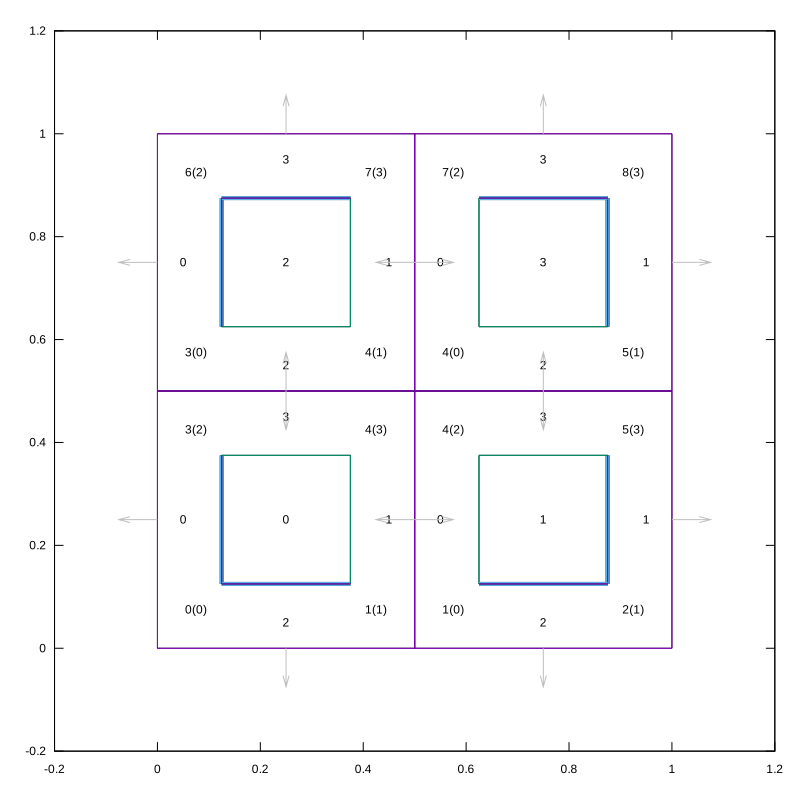
printGrid writes a gnuplot-style file useful for quick structural inspection:
#include <dune/grid/io/file/printgrid.hh>

Dune::printGrid(grid,
                "grid_topology",
                /*size=*/800,
                /*execute_plot=*/false,
                /*png=*/false,
                /*local_corner_indices=*/true,
                /*local_intersection_indices=*/true,
                /*outer_normals=*/true);
execute_plot=false means DUNE only writes grid_topology.gnuplot.
You can run gnuplot manually afterwards.
Runnable example: examples/05_grid_printgrid/print_grid.cc
1 2 3 4 5 6 7 8 9 10 11 12 13 14 15 16 17 18 19 20 21 22 23 24 25 26 27 28 29 | |
Build and run:
source _env/activate.sh
cd examples/05_grid_printgrid
dunecontrol --current all
./build/debug/example05
gnuplot -p grid_topology.gnuplot
ls -1 grid_topology.*
Output:
Generated: grid_topology.gnuplot
Run 'gnuplot -p grid_topology.gnuplot' to render grid_topology.svg
grid_topology.gnuplot
grid_topology.svg
VTK writer
Use this when you want to inspect the grid in ParaView.
For visualization in ParaView:
#include <dune/grid/io/file/vtk/vtkwriter.hh>

auto gv = grid.leafGridView();
Dune::VTKWriter<decltype(gv)> vtk(gv);
vtk.write(/*name=*/"grid");
This is the standard first step for visual output in DUNE C++ tutorials.
Notes
GmshReadersupport and element mappings depend on grid type and mesh features.- Additional I/O and visualization options are covered later in extension topics (
dune-vtk,dune-gmsh4).
Summary and next steps
You now know the basic DUNE grid I/O workflow from mesh import to visualization export. Continue with Grid info utilities to inspect and validate grid structure quickly.